Professional Invoice Templates for Clean Business Billing
Whether you are a freelancer sending your first bill or a growing agency managing dozens of clients, the moment you send an invoice, you are sending a message. It says something about your attention to detail, your brand identity, and how seriously you take your work. A cluttered, inconsistent, or unprofessional invoice can undermine trust, while a clean, well-structured one reinforces the quality of your service. This is where having the right tools makes a tangible difference in your daily workflow.
More Than Just a Bill: The Role of Visual Consistency
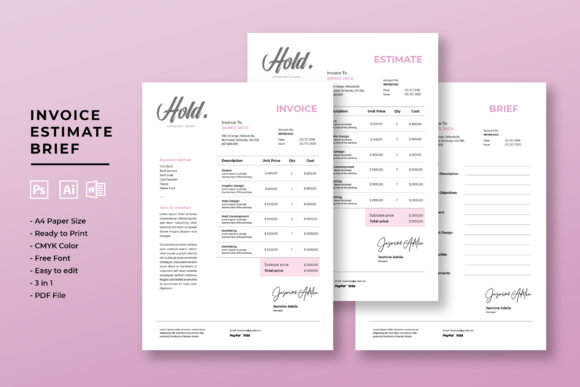
A Professional Invoice Template is a pre-designed document framework that goes beyond basic accounting. It’s a piece of your brand’s visual system. The templates we’re discussing are built with a modern, minimalist aesthetic. Think clean lines, ample white space, and a logical visual hierarchy that guides the eye from your company logo at the top, through the line items, down to the payment details. The style is intentionally neutral yet polished—it doesn’t scream for attention but instead conveys reliability and order. This makes it versatile enough for a freelance graphic designer, a boutique marketing consultant, a small e-commerce shop, or a corporate service provider.
The practical appeal lies in its structure. These files are designed for real-world use, not just for looking good on a screen. Being available in both A4 and US Letter sizes means you’re covered for clients almost anywhere. The 300 DPI resolution and CMYK color mode ensure that if you ever need to print a physical copy for your records or a client, it will be sharp and color-accurate. The inclusion of a 3 mm bleed is a detail professional designers appreciate, as it prevents any unprofessional white edges if the print is trimmed slightly off.
Customization That Saves You Time
The true value of these design assets is in their editability. You’re not locked into a static PDF. Because the templates are provided in formats like Microsoft Word, Adobe Photoshop, and Adobe Illustrator, you have full control. This is critical for maintaining brand consistency. You can easily swap the placeholder text with your business name and details, change the color scheme to match your brand palette, and adjust the fonts to your primary typeface—all with just a few clicks.
This level of customization directly impacts several key areas:
- Brand Recognition: Using your specific brand colors and logo on every invoice reinforces who you are. Over time, clients will recognize your paperwork instantly.
- Professionalism: A customized, error-free document shows you care about the details. It builds trust before the client even reads the numbers.
- Efficiency: Instead of starting from scratch each time, you have a polished, pre-formatted starting point. This streamlines your billing process, letting you create a professional-looking invoice in minutes, not hours.
It’s also worth noting the design philosophy here. All shapes and elements are vector-based and pixel-perfect, meaning they scale beautifully without getting blurry. The use of free fonts is a significant practical benefit—you won’t have to purchase additional commercial licenses just to use your own template, which is a common frustration with some premium design resources.
Choosing and Using Your Template Effectively
When selecting from a set of Professional Invoice Templates, don’t just pick the first one you see. Evaluate it like you would any other piece of your marketing collateral.
- Assess the Layout: Does the information hierarchy make sense? The most important details—invoice number, due date, and total amount due—should be immediately obvious. A good template will have these elements prominently placed.
- Test the Editability: Open the file in your preferred software (Word, Photoshop, or Illustrator) before you commit. How easy is it to change the main headline color? Can you resize the logo area without breaking the layout? This quick test saves future headaches.
- Consider Font Pairing: While the template comes with its own suggested fonts, think about how they pair with your existing brand typeface. If your brand uses a strong sans serif font for headings, you might want to adjust the invoice template to match. The goal is seamless integration with your other brand identity materials, like proposals, letterheads, and your website.
- Review for Completeness: Ensure the template has all the fields your business needs. Do you require a section for purchase order numbers, project codes, or detailed service descriptions? A well-designed template will have logical placeholders for these.
Think of this template not as a static file, but as a foundational design asset. It’s a starting point that you mold to fit your unique business needs. For a content creator or blogger, it might be simplified to only show payment for sponsored posts or affiliate earnings. For a small manufacturer, it could be adapted to include columns for quantity, unit price, and SKU numbers for physical products.
The key is to use the template’s professional structure as your backbone and then inject your brand’s personality. This approach ensures your billing process is not only efficient but also an integrated part of your overall client experience, strengthening your brand perception