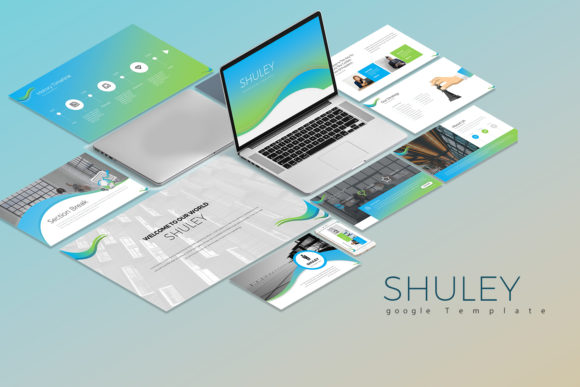
Shuley Google Slide Templates: Clean, Creative, Modern
In the fast-paced world of business, your presentation is often your first handshake. It sets the tone for your professionalism, your attention to detail, and the value of your ideas. This is precisely where the Shuley Google Slide Templates step in, offering more than just a set of slides—they provide a cohesive visual language for your brand. The Shuley template is designed to bridge the gap between high-end graphic design and practical, everyday corporate needs. It is an asset that allows you to command attention without sacrificing clarity, ensuring your message resonates with your audience long after the final slide fades.
A Visual Identity Built on Scalability and Style
The defining characteristic of Shuley is its balance of clean, creative, simple aesthetics. It avoids the trap of being overly decorative, which can distract from the data, or too stark, which can bore the viewer. Instead, it utilizes a modern typography approach that feels fresh yet grounded. The template includes 30 unique slides (60 total with the dark and white background versions), offering a comprehensive toolkit for any narrative. Whether you are building a brand identity deck, a quarterly financial report, or a marketing pitch, the 16:9 aspect ratio ensures your content looks native on modern displays.
What makes this presentation template particularly effective is its focus on visual hierarchy. By utilizing well-structured layouts, it guides the viewer's eye naturally from the headline to the key data points. This is crucial for readability and audience engagement. The design is scalable, meaning it works just as well for a small team meeting as it does for a conference keynote. The vector icons included in the files are a significant bonus, allowing you to illustrate complex concepts without needing external design assets. These icons maintain their crispness at any size, contributing to a polished, professional finish that elevates your brand perception.
Practicality Meets Customization
A common frustration with premium fonts and templates is the difficulty in editing them. Shuley addresses this by making all elements easily editable. You are not locked into a rigid structure. The 1 color scheme serves as a sophisticated starting point, but the template is flexible enough to adapt to your specific brand identity. If you need to adjust the color palette to match your company’s hex codes, the process is straightforward. Furthermore, the fully editable charts are a game-changer for data-heavy presentations. Instead of pasting static images, you can update the data directly, ensuring accuracy and saving valuable time.
For those concerned with workflow, the Shuley package is designed for efficiency. It comes with 2 file PPTX for Google Slide compatibility, ensuring you can work within the Google ecosystem seamlessly. The inclusion of a documentation & quick guide file means you won't be left guessing how to manipulate the master slides. This level of support is essential for entrepreneurs, marketers, and small business owners who need to focus on content creation rather than troubleshooting design software. The template also supports image placeholders, making it incredibly easy to drag and drop your own photography or stock images to personalize the narrative.
Strategic Applications for Modern Creators
The versatility of Shuley makes it an ideal choice for a wide range of projects. For designers and creative professionals, it serves as a blank canvas that respects modern design principles. It is perfect for packaging design proposals or web design mood boards where the presentation itself needs to look as good as the work being showcased. Bloggers and content creators can leverage the template to create social media graphics or media kits that look consistent and unique. The clean lines ensure that text remains legible, whether viewed on a laptop screen or projected in a boardroom.
When using Shuley, consider the principles of font pairing. While the template comes with recommended free fonts (ensure you install fonts before opening the PowerPoint file), you can experiment with mixing a sans serif font for body text with a display font for headlines to create a stronger contrast. However, the built-in typography is already optimized for consistency and professionalism. The stock photos used in the preview are not included, which is actually a benefit—it forces you to inject your own authentic imagery, making the final result truly yours. By utilizing the dark background versions, you can create a dramatic, high-contrast look suitable for evening events or luxury brand presentations, while the white background versions offer a crisp, approachable feel for corporate training or educational content.
Ultimately, the Shuley Google Slide Templates are about removing the friction from the design process. They provide a robust framework that supports your ideas rather than overshadowing them. Whether you are a hobbyist putting together a portfolio or a publisher outlining a new book launch, the ability to produce a multipurpose, high-quality presentation quickly is invaluable. It ensures that your focus remains on delivering value, confident that the visual foundation of your presentation is solid, stylish, and ready to impress.